State and local governments can buy from GSA Multiple Award Schedule (MAS) contracts, but only through three GSA programs: Cooperative Purchasing, Disaster Purchasing, and Public Health Emergencies (GSA.gov). Each program covers different products and applies under different conditions.
For a contractor, those limits decide whether a city, county, or school district can order from you at all. Knowing how state and local agencies purchase through GSA Schedules tells you which SINs qualify and what your contract must show. It also shows where you lose orders without noticing.
Key Takeaways
- State and local agencies can buy from GSA Schedules only through three programs: Cooperative Purchasing, Disaster Purchasing, and Public Health Emergencies.
- Cooperative Purchasing covers IT, law enforcement, and security SINs only, and buyers can use it at any time.
- Disaster Purchasing opens all of MAS for preparation, response, and recovery tied to declared disasters.
- Public Health Emergencies opens MAS for grant-funded purchases after an HHS declaration.
- Contractor participation is voluntary. You can decline a state or local order within 5 days, or 24 hours for credit card orders.
- These orders are Schedule sales, so you report them through TDR and pay the 0.75% IFF on them.
Can State and Local Buyers Order From Your Contract?
We will review your SINs and program elections and tell you which state and local orders you can accept today.
Get My Contract Reviewed →Table of Contents
Why the State and Local GSA Schedule Market Matters
The MAS program closed FY2025 with $50.6 billion in total sales across approximately 14,579 active contractors (GSA SSQ+, 2025). Most of that volume comes from federal agencies. However, a participation election lets the same contract serve a second group of buyers without a new solicitation.
That second group can also protect your contract. You must generate at least $100,000 in Schedule sales during the first five years, and $125,000 in each later option period (Clause I-FSS-639). GSA reduced its contractor base by roughly 1,500 contracts between FY2024 and FY2025, and contracts below the minimum are not being renewed (GSA SSQ+).
In short, eligible state and local orders are placed under your Schedule, so you report them like any other Schedule sale. Here is how state and local agencies purchase through GSA Schedules under each program:
| Program | What buyers can purchase | When it applies | Authority |
| Cooperative Purchasing | IT, law enforcement, and security products and services from eligible SINs | Any time, for current or future needs | Section 211, E-Government Act of 2002 |
| Disaster Purchasing | Any product or service on MAS | Preparation, response, or recovery for FEMA-declared disasters, terrorism, or nuclear, biological, chemical, or radiological attacks | 40 U.S.C. 502(d); Section 833, FY2007 John Warner NDAA |
| Public Health Emergencies | Supplies such as masks, gloves, cleaning supplies, and medical equipment | After the HHS Secretary declares a public health emergency, using federal grant funds | Section 319, Public Health Service Act |
Sources: GSA.gov program pages for Cooperative Purchasing, Disaster Purchasing, and Public Health Emergencies.
Each program has its own scope, so the next three sections take them one at a time.
What the GSA Cooperative Purchasing Program Allows
This program lets eligible state and local governments buy commercial IT, law enforcement, and security products and services from eligible categories (GSA.gov). Buyers can use it at any time, for current or future needs. No disaster or emergency declaration is required.
GSA groups the eligible offerings into two areas:
- IT solutions under the MAS IT Category, including hardware, software, firmware, and mobile device and application management tools.
- Security and protection solutions, including law enforcement, urban firefighting, and wildland firefighting equipment.
Here is the part manufacturers often miss. Cooperative Purchasing does not open your whole contract. If you sell janitorial supplies or office furniture on MAS, those SINs stay outside this program, even when the same contract also carries IT SINs.
Buyers find participating vendors by the COOP icon on GSA Advantage and GSA eLibrary. GSA also recommends that each order or RFQ cite the MAS contract number, the SINs, and the Cooperative Purchasing authority. Vendors must include their MAS contract number in their responses to receive an award.
Cooperative Purchasing is one of several government cooperative purchasing programs a state buyer may compare. Many states also run their own cooperative contracts. As a result, your Schedule pricing and terms need to hold up against those alternatives.
Not Sure If Your Contract Shows the COOP Icon?
We will check your eLibrary listing and tell you which of your SINs state and local buyers can use today.
Check My Cooperative Purchasing Status →GSA Disaster Recovery Purchasing for State and Local Agencies

This program, which GSA now lists as Disaster Purchasing, has a much wider scope than Cooperative Purchasing. Eligible state and local governments can buy any product or service on MAS, or set up blanket purchase agreements with MAS contractors (GSA.gov).
The purchase must support one of these purposes:
- Preparation for, response to, or recovery from a natural or man-made disaster declared under the Stafford Act.
- Recovery from terrorism, or from a nuclear, biological, chemical, or radiological attack.
Every Disaster Purchasing order must include GSA’s mandatory order language, with the MAS contract number. Local officials, not the contractor, are responsible for confirming the purchase actually supports disaster preparation or recovery.
For manufacturers of generators, safety gear, or heavy equipment, this is often the most practical route to state and local work. Disaster Purchasing applies across every MAS Large Category. The trigger is the purpose of the purchase, not the type of product.
Using the GSA Public Health Emergencies Program

The Public Health Emergencies (PHE) program applies only after the Secretary of Health and Human Services declares a public health emergency (GSA.gov). Eligible state and local governments can then use federal grant funds to place orders or set up blanket purchase agreements.
Typical purchases include masks, gloves, cleaning supplies, and medical equipment. Each order must state that it spends federal grant funds on a PHE declared under Section 319 of the Public Health Service Act. It must also name the specific declaration.
The grant rules carry as much weight as the GSA rules here. Buyers spending grant money must follow their own procurement regulations and the granting agency’s procedures, so expect more paperwork than a routine order.
Who Qualifies Under State and Local Government GSA Schedule Rules
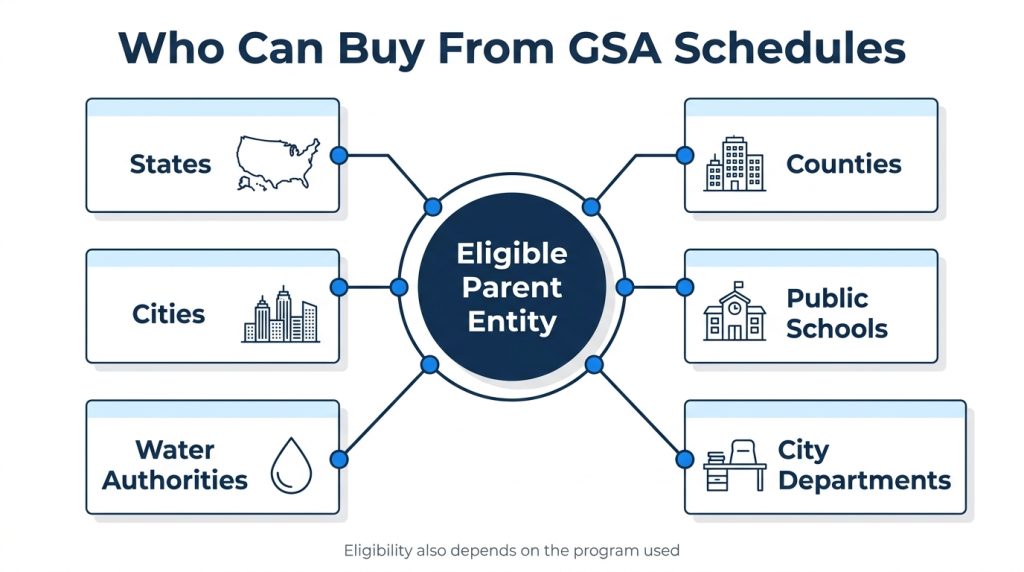
GSA Schedule eligibility for state and local governments covers states, local governments, and their instrumentalities, such as public schools and water authorities (GSA.gov). Offices under an eligible parent are generally eligible too. For example, if a city government qualifies, its departments generally do as well.
Under these rules, buyers and sellers each carry specific responsibilities:
| Rule | What it means in practice |
| Terms flow down | Your Schedule terms and conditions flow down to state and local orders, with limited exceptions under GSAR 552.238-79. |
| Ordering procedures | GSA recommends the Federal Supply Schedule procedures in GSAR Subpart 538.71. Buyers must still follow their own procurement rules. |
| Grant-funded orders | Buyers must follow local procurement rules and the granting agency’s procedures. |
| Order acceptance | You may decline a state or local order within five days of receipt, or within 24 hours for credit card orders. |
| Authorized buyers | As the seller, you are responsible for confirming that only authorized representatives place orders. |
Source: GSA.gov, terms and conditions for state and local programs.
For a public buyer asking how to purchase through GSA, the process usually runs in five steps:
- Confirm eligibility on GSA’s state and local eligibility determinations page.
- Match the purchase to a program: Cooperative Purchasing, Disaster Purchasing, or PHE.
- Search the GSA online catalog or eLibrary for vendors showing that program’s icon.
- Compete the requirement under local rules, using FSS ordering procedures as a guide.
- Issue the order with the MAS contract number and any required program language.
Those steps cover how state and local agencies purchase through GSA Schedules from the buyer’s side. The contractor’s side starts earlier, with how your contract is set up.
How GSA Contractors Opt In to Cooperative Purchasing
Contractor participation in these programs is voluntary. Most offerors make the election in the MAS offer itself. If your awarded contract does not show participation, you can add it later through a GSA MAS modification.
One situation we see often: a security equipment manufacturer gets a request from a county sheriff’s office. The team then learns its contract never elected Cooperative Purchasing. The modification fixes the problem, but the buyer’s quote window has usually closed by the time it is approved.
Before you pursue state and local buyers, check these points:
- Confirm your eLibrary listing shows the program icons you expect.
- Confirm your eligible SINs carry current pricing in your online catalog.
- Set an internal rule for reviewing state and local orders inside the five-day decline window.
- Report these sales through Transactional Data Reporting (TDR) and pay the 0.75% Industrial Funding Fee on them, as with any Schedule sale (vsc.gsa.gov).
On the last point, TDR became mandatory for every MAS SIN under Refresh 31 on April 2, 2026. The grace period runs through December 31, 2026, and full enforcement begins January 1, 2027 (gsa.gov). State and local orders are part of the data you report each month.
Need the Opt-In Added to Your Contract?
Our Authorized Negotiators prepare and file the modification so your eligible SINs are visible to state and local buyers.
Get My Opt-In Modification Filed →GSA Purchasing Mistakes That Cost Contractors State and Local Orders
Most lost orders trace back to a few setup and process errors. These are the ones we correct most often for clients:
- Assuming every SIN is open to state buyers. Only IT and security-related SINs qualify under Cooperative Purchasing.
- Letting the decline window lapse. If you do not decline an order in time, buyers treat it as accepted, and your full MAS terms apply.
- Running a stale catalog. Contracting officers skip listings with outdated pricing or missing product data, and state buyers see the same listing.
- Ignoring local procurement rules. A buyer’s own regulations can add steps GSA does not control, especially on grant-funded orders.
Each of these is fixable before a buyer ever calls, which is where outside support helps.
How GSA Contract Services Helps With State and Local Sales
GSA Contract Services has supported GSA Schedule contractors since 1995. We work with more than 250 active clients through a team of over a dozen Authorized Negotiators. For state and local sales, we start by mapping how state and local agencies purchase through GSA Schedules against your SINs. The work typically includes:
- Reviewing which of your SINs qualify for each program, as part of GSA contract compliance support.
- Filing modifications to add Cooperative Purchasing or Disaster Purchasing participation.
- Updating your Schedule catalog so eligible products show current pricing.
- Handling incoming orders through GSA order management and EDI catalog uploads.
If you do not hold a contract yet, we can help you obtain a GSA Schedule contract with the right program elections from day one. For self-study, GSA posts GSA MAS training and vendor office hours on GSA Interact and the Vendor Support Center.
Quick Recap
Here is how state and local agencies purchase through GSA Schedules, in brief:
- Cooperative Purchasing covers IT and security-related SINs, at any time.
- Disaster Purchasing opens all of MAS for qualifying disaster preparation, response, and recovery.
- Public Health Emergencies opens MAS for grant-funded purchases after an HHS declaration.
- Contractor participation is voluntary, and you can decline any state or local order within five days.
- These sales are reported through TDR and carry the 0.75% IFF.
FAQs on GSA Programs for State and Local Governments
What is GSA cooperative purchasing?
It is a GSA program that lets eligible state and local governments buy IT, law enforcement, and security products and services from participating MAS contractors. Buyers can use it at any time, without a disaster or emergency declaration.
What does it mean to have a GSA schedule?
It means GSA has awarded your company a MAS contract with pre-negotiated prices and terms. Federal agencies, and eligible state and local buyers under the three programs, can then order from you without a separate full competition. A contract runs five years, with three five-year options.
What is the easiest government contract to get?
No federal contract is easy to win, but some routes have fewer hurdles than others. We compare those routes, including where a GSA Schedule fits, in our guide to the easiest government contracts to get.
Can state and local agencies buy anything listed on GSA Advantage?
No. Under Cooperative Purchasing they can buy only from eligible IT and security-related SINs. Disaster Purchasing and PHE open the full Schedule, but only for qualifying purposes.
Do state and local sales count toward GSA minimum sales requirements?
Orders placed under your MAS contract are Schedule sales, and you report them through TDR. Confirm the treatment of your specific sales with your Contracting Officer before you rely on them to meet the $100,000 base period minimum.
How to market your GSA contract to state and local buyers?
Start with your eligible SINs and confirm the program icons appear in eLibrary. Then contact state and county procurement offices directly, cite your MAS contract number, and explain which program applies to their need.
Ready to Sell to State and Local Buyers?
Talk to a GSA Schedule advisor about your SINs, your program elections, and your next step.
Talk to a GSA Advisor →